
I’ve been thinking a lot about text-to-speech synthesizers lately. For as long as text-based narrative has existed in games, developers have tried new ways to simulate the human voice. Doing so is a way to give the player a sense that they’re actually listening to a person talking to them instead of just reading a wall of text. Early games utilized what an excellent Polygon video refers to as ‘Beep-speech’, wherein the developer plays a long series of ‘beeps’ and ‘boops’ to simulate the cadence of a human voice. Over time this has evolved, and become more complex. The Sims is a great example of using real human voices to create a fake, gibberish language which they’ve called Simlish. Using this, they’re able to avoid the annoying repetition of canned voice lines which may have happened if they had actually recorded every line of dialog in the game. Not to mention the sheer cost of hiring voice actors to read the novels worth of dialog.
One of my favorite uses of this method is in Animal Crossing. They use what they call Animalese, which consists of a collection of recordings of real human voices pronouncing every letter of the alphabet. This audio is then re-timed, pitched shifted, and then played in real-time as the text is scrolled across the screen. This gives you the flexibility to alter the pitch and timing to create potentially hundreds of unique character voices using only a small sample of audio files.
Writing something like this is also stupid easy.
if (floor(char_current) != char_last)
{
	char_last = floor(char_current);

	var letterSound = asset_get_index("sound" + string_lower(string_copy(_str, char_last, 1)));

	if (letterSound > -1)
	{
		audio_sound_pitch(letterSound, 2.2 + random_range(-0.1, 0.1));
		play_sound(letterSound, 0.5, 1, false);
	}
}
char_current is the position of the “cursor” as it passes through the text letter-by-letter. Because it can move at a speed less than 1, I’m flooring it and checking it against char_last to ensure each sound is only played once per letter. What we’re doing here is simple: For each letter of the alphabet, I’ve recorded a separate sound file. As the dialog object is typing the text out, we’re checking each character and seeing if a corresponding sound for it exists. If it does, we play that sound at a base pitch of 2.2, which is then modulated up or down by a value between -0.1 – 0.1. The additional pitch modulation is just to help add a bit of variety to the sound. Both the base pitch and random pitch modulation can be changed to create unique voices.
I also wrote a very simple parser to read dialog straight from .txt files.
function dialog_parse(dialogFile)
{
	var file, outArray;

	file = file_read(dialogFile);
	outArray[0, 0] = "";

	for (i = 0; i < array_length(file); i++)
	{
		outArray[i, 0] = string_copy(file[i], 7, string_length(file[i]) - 6);
		outArray[i, 1] = real(string_copy(file[i], 2, 4));
	}

	return outArray;
}
Each read dialog file is stored in a 2-dimensional array which contains both the text and the speed at which to read it for every line of dialog in a conversation. The dialog files themselves are formatted like this:
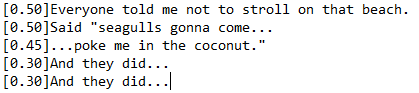
Where the read-speed is listed in brackets before the line itself. And that’s really all there is to it.
Thanks for reading!

 Roebuck's Ramblings